

Over the past few years, the concept of micro frontends has matured from being just an architectural trend to becoming a go-to strategy for organizations looking to scale frontend development efficiently. Especially in large enterprises, where multiple teams work in parallel on different features or domains, breaking down the front end into smaller, independent pieces has become a necessity — not just a trend.
Fast forward to 2025, and it’s now common to come across modern web applications composed of several micro frontend modules. What makes this approach even more fascinating is the diversity within these modules. They are often built using entirely different JavaScript frameworks like Angular, React, or Vue. Each team gets the freedom to choose the tools that best suit their domain.
However, this flexibility doesn’t come without its set of challenges.
One of the biggest roadblocks in such heterogeneous environments is integration. Specifically, if you wish to bring Angular into the mix with other frameworks, it can feel like fitting a square peg into a round hole — unless you’ve got the right tools at your disposal.
That’s exactly where Angular Elements steps in! It offers a practical, elegant way to package Angular components as custom elements that can run in any front-end environment, no matter what the framework.
So, in this blog, I’ll walk you through how I’ve personally leveraged Angular Elements to bridge Angular into existing micro frontend architectures. I’ll also share why this strategy isn’t just a technical workaround, but a smart, forward-thinking approach that aligns beautifully with the evolving needs of frontend ecosystems today.
Let’s begin by understanding why adopting micro frontends could be a smart move for your application architecture.
Why Should You Go for Micro Frontends?
Let’s pause for a moment and think about the big picture.
In many organizations, front-end development isn’t confined to a single team or technology. You might have one team developing the payments module of an app in Angular, while another might be building the dashboard in React. Micro frontends make this kind of parallel development not only possible but efficient. This allows each team to build, deploy, and scale their slice of the UI independently, without stepping on each other’s toes.
Here are some key benefits of this approach:
1. Teams are not blocked by each other.
Each team can work on its specific module independently, without waiting for other teams to finish their tasks or align on release schedules. This leads to faster development cycles and greater autonomy.
2. You can mix and match technologies (use what suits the team).
Whether it’s Angular, React, Vue, or something else entirely, teams have the freedom to choose the framework that best suits their expertise and the specific needs of their module. This flexibility promotes innovation and reduces unnecessary constraints.
3. Codebases stay smaller and easier to maintain.
Instead of managing one massive monolithic frontend, each micro frontend maintains a focused, modular codebase. This not only simplifies debugging and testing but also makes onboarding new developers easier.
4. Deployment pipelines are decoupled.
Since each micro frontend is independently deployable, teams can push updates without worrying about breaking the entire application. This enables quicker releases and safer rollbacks when needed.
Onwards to know about the hero of this blog a.k.a. the solution – Angular Elements!
What Are Angular Elements?
To put it simply, Angular Elements allow you to turn any Angular component into a Web Component. Think about a reusable custom HTML tag that can be used in any front-end framework or even plain HTML. Quite interesting, right?
Behind the scenes, Angular Elements wraps your component using the Web Components standard (with customElements.define) so that it behaves just like any other DOM element. This means you can build a component in Angular and then embed it inside a React app or a vanilla JS app without much hassle.
To be honest, for anyone working in a multi-framework environment, this is a game-changer.
Note: That said, combining everything into a smooth, cohesive UI is not always easy. That’s where Angular Elements help. They allow Angular apps to play nicely in a micro front-end world.
Here’s a diagrammatic representation of how Angular Elements facilitate the use of Angular components as reusable web components in other JavaScript frameworks. It specifically highlights their use in a micro-frontend architecture with a React application:
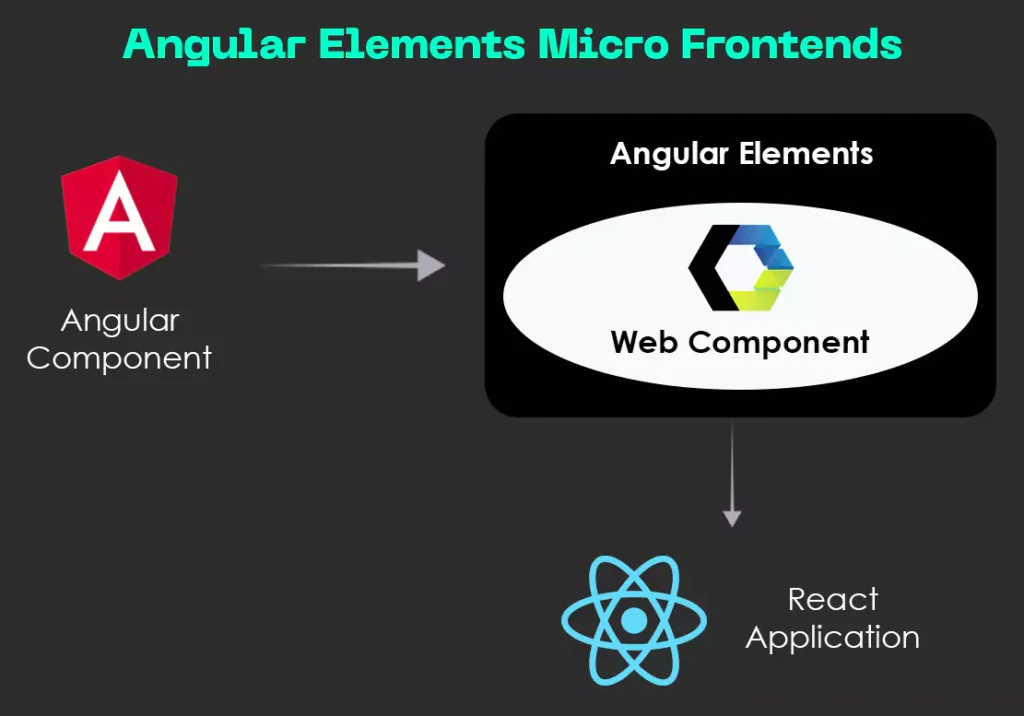
Fig: Angular Element for Micro Frontends
Next, you’ll get to know about the practical steps to use Angular Elements for Micro Frondends.

Not sure which front-end path to take? Compare Angular, Vue, and React and march forth with clarity.
How Can You Use Angular Elements to Bridge Micro Frontends?
Imagine you’re working on a shell application built in React, and there’s an existing widget — say, a user profile card or a dynamic chart — that was originally developed in Angular.
Now, rather than spending valuable time and effort rewriting that Angular component from scratch in React, there’s a smarter path forward. You can use Angular Elements to package that component as a custom web element. This way, you will effectively transform it into a reusable HTML-like tag that can be embedded directly into your React application.
I mean, something like this:
<user-profile-card user-id="123"></user-profile-card>
What makes this approach so elegant is that the custom element, though powered by Angular behind the scenes, behaves just like a standard HTML tag when used in the host application. All the Angular logic — including data binding, lifecycle management, and rendering — operates quietly in the background. Meanwhile, the consuming app simply interacts with it as if it were any native DOM element.
This not only simplifies the integration process but also reinforces team autonomy. Each team can continue using their preferred framework and development workflow, without being tightly coupled to the technologies used elsewhere in the application.
One of the most crucial steps in this process is transforming your Angular component into a fully functional web component.
Here’s exactly what you need to follow (this is a basic example):
1. Create a simple Angular component: This is your core UI element with input properties that define its behavior. To do so, you can refer to this code snippet:
import { Component, Input } from '@angular/core';

@Component({
selector: 'app-greeting',
standalone: true,
template: `<h2>Hello, {{ name }}!</h2>`,
})
export class GreetingComponent {
@Input() name: string = 'World';
}
2. Convert it to a Web Component: This step packages your Angular component into a reusable custom element using Angular Elements. To convert it into a web component, follow this code snippet:
import { createCustomElement } from '@angular/elements';
import { bootstrapApplication } from '@angular/platform-browser';
import { GreetingComponent } from './greeting.component';
import { inject } from '@angular/core';

bootstrapApplication(GreetingComponent).then(() => {
const element = createCustomElement(GreetingComponent, {
injector: inject(Injector)
});
customElements.define('app-greeting', element);
});
3. Use it anywhere: Now you can drop the component into any HTML or frontend framework as if it were a native tag. Here’s how it should look:
<app-greeting name="John"></app-greeting>
And just like that, your Angular component will no longer be tied to the Angular ecosystem. It will be a fully functional, framework-agnostic web component that can be embedded anywhere, from React to plain HTML.
Think we’re done? Well, not quite.
We’ve created the Angular Element and embedded it into a host application. But there’s one more crucial piece to complete the puzzle: enabling communication between the Angular component and its host.
This layer ensures your component isn’t just sitting there silently but actively exchanging data — listening to inputs and responding to custom events.
Keep reading!
How Do Angular Elements Communicate with the Host App?
Once your Angular component is running as a custom element, the next step is making sure it can talk to the host application — passing data in and out smoothly. Fortunately, Angular Elements makes this process more straightforward than you might expect.
Passing data into the component is as simple as setting HTML attributes.
For instance, if your Angular component has an @Input() called name, you can pass a value like this:
<app-greeting name="John"></app-greeting>
This behaves just like setting an attribute on a native HTML element.
Sending data back to the host app is done using custom events.
You can dispatch events from within your component to notify the host when something important happens — like a user interaction or an update.
Here’s how you can emit a custom event from the Angular Element:
this.dispatchEvent(new CustomEvent('greeted', {
detail: { name: this.name }
}));
And here’s how the host app (like a React or plain JavaScript app) can listen for it:
document.querySelector('app-greeting')
.addEventListener('greeted', e => {
console.log('Greeting sent to:', e.detail.name);
});
This simple event-driven approach ensures smooth communication between the component and its container — without tight coupling or framework-specific dependencies.
Once you’re done setting up and integrating your Angular Element, there are a few important deployment tips you’ll want to keep in mind to ensure everything runs smoothly in production.
Extra read: Transforming State Management with Angular SignalStore
How Can You Deploy Angular Elements?
Once your Angular Element is built, you can deploy it just like any other static asset. Host it on a CDN, bundle it with your CI/CD pipeline, or version it separately.
Here are a few important tips that can help ensure smooth deployment and integration of your Angular Elements in real-world applications:
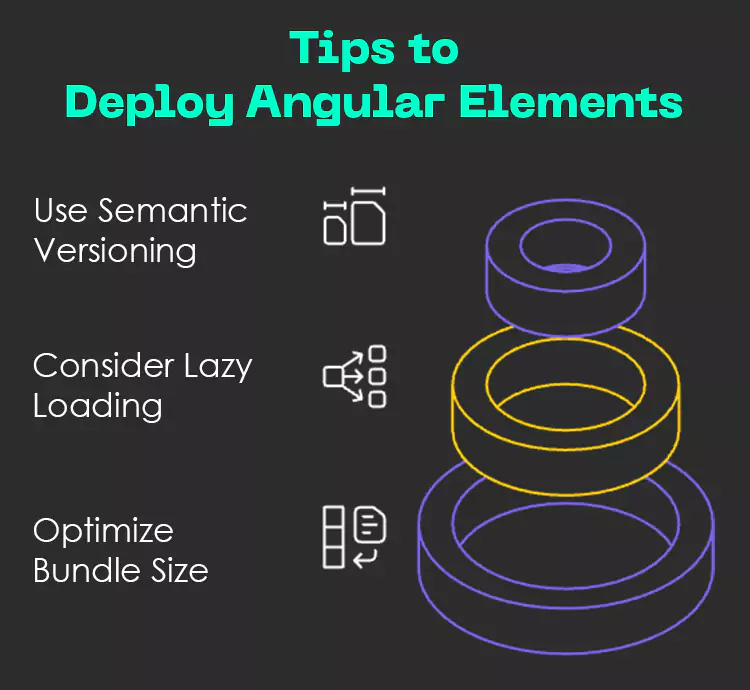
Fig: Tips to Deploy Angular Elements
- Use semantic versioning for safe upgrades: Assign clear and consistent version numbers to your Angular Elements using semantic versioning. This helps other teams or apps consuming your component know exactly what changes have occurred — whether it’s a patch, minor enhancement, or a major breaking change — making upgrades more predictable and manageable.
- Consider lazy loading if it’s a heavy component: If your Angular Element is large or loaded with dependencies, don’t let it slow down your entire application. Instead, load it only when needed — on a specific user action or page route. Lazy loading improves performance by reducing the initial load time and ensures your shell app stays fast and responsive.
- Optimize bundle size with Angular’s build tools: Make the most of Angular’s modern build capabilities like tree shaking, which removes unused code, and standalone components that reduce module overhead. These optimizations can significantly shrink your final bundle size. They can lead to faster load times and better user experience across devices.
Before we wrap things up, there are a few important considerations you should keep in mind when working with Angular Elements.
What Should You Watch Out for When Using Angular Elements?
While Angular Elements are powerful, they come with a few trade-offs, such as:
- Bundle size: Even a small component might pull in a lot of Angular’s core unless optimized.
- Initial load time: Preloading or using a loading spinner always helps.
- Style isolation: Angular’s view encapsulation usually protects against CSS conflicts, but it’s worth testing.
- Browser support: Most modern browsers support web components, but check compatibility if you’re targeting legacy users.
That’s it!
Here are my final thoughts on the topic for today.
In 2025, frontend teams are more diverse and distributed than ever — and micro frontends will help us scale effectively. However, making them work together seamlessly still requires thoughtful architecture.
With Angular Elements, we don’t have to abandon Angular just to keep up with a micro frontend strategy. Instead, we can package our Angular features into clean, reusable web components that integrate wherever needed — be it a React shell, a Vue app, or even plain HTML.
To wrap it up, if your team is navigating the world of micro frontends, Angular Elements is worth exploring. They strike a powerful balance between flexibility and consistency, empowering teams to work independently while keeping the overall architecture cohesive. In many cases, they might just be the missing piece that brings your micro frontend vision to life, efficiently and elegantly.
Wish to learn more about Angular Elements and other super-advanced technologies? Reach us at Nitor Infotech, an Ascendion company – we’re here to help you modernize your business with confidence.