

Katalon Studio enables effective web app testing by seamless API automation integration. Testers can create stable API test suites with different HTTP methods, distinct headers, and dynamic variables. It strikes the backend functionality with fewer UI stability dependencies when executing tests. API test automation helps teams gain faster feedback, increased test coverage, and earlier defect detection for web applications.
In modern web application testing or software testing, automation is essential for efficiently handling complex test scenarios and large data sets. This is because manual testing of complex web applications is time-consuming, error-prone, and difficult to scale, especially when handling multiple data combinations.
Let’s say an application requires manual testing of Entities and Components. This may cover only 30-40 data combinations, taking several hours per cycle, with risks of inconsistencies and human errors. So, ensuring data accuracy across various configurations requires repeated validations within such applications. In such scenarios, API automation with Katalon Studio can be the potential solution to optimize testing efforts.
In this blog, you will learn everything about API automation using Katalon Studio. Specifically, you will be able to focus on automating the creation of Entities and Components while covering multiple data combinations.
By implementing data-driven testing using structured Excel payloads and automated data extraction, I will show you the method to streamline test execution and minimize manual effort. This approach will ensure comprehensive test coverage and capture API responses for validation, with certain cases requiring manual verification within any application.
So, let’s get started with learning about the roadblocks of manual testing!
What are the Challenges of Manual Web Application Testing?
Testing with multiple data combinations manually posed several challenges, such as:
- Time-Consuming: Manually testing each combination in an application is slow and inefficient, especially when dealing with hundreds or thousands of possible scenarios.
- Limited Coverage: Due to time constraints, only a small subset of total data combinations can be tested. This leaves a lot of edge cases unverified.
- Human Error: Manual data entry, API request validation, and response checks can be prone to errors. This can lead to missed bugs and inconsistencies.
- Repetition & Scalability Issues: Repeating tests for every data variation may get tedious and make it difficult to scale testing efforts efficiently. That is, handling thousands of API calls manually is impractical.
- Data Integrity Challenges: Ensuring that API responses match expected results requires constant verification. Here, manual validation increases the risk of mismatches and incorrect assumptions.
- Authentication Complexity: Many API calls require token-based authentication, adding complexity to manual testing. Managing and refreshing authentication tokens manually is both time-intensive and error-prone.
Now that you’re familiar with the challenges, let’s take a step toward the solution. But first, it’s essential to understand the fundamentals of API test automation.
What is API Test Automation?
In simple words, API test automation involves using scripts or testing tools to send requests to application programming interfaces (APIs), validate their responses, and ensure they function as expected. Unlike UI testing, API testing focuses on the business logic layer, verifying data exchange, response correctness, and performance.
Here are some of the key aspects of API test automation:
- Validation of request-response formats (JSON, XML, etc.)
- Ensuring API endpoints function correctly across various conditions
- Automating workflows that depend on multiple API calls
- Performance and security testing to evaluate API efficiency and security measures
Onwards to know about the solution (the what and the how)!
How Can Katalon Studio Accelerate Manual Web App Testing?
In a recent scenario, I observed that API automation demonstrated the ability to validate over 150 data combinations within just 1.5 to 2 hours. This marked a substantial reduction in execution time and a significant boost in test coverage. This observation proves, to overcome the manual web application testing challenges, you can implement API automation using Katalon Studio.
Moreover, by integrating a Data Parser, parameter extraction from payloads can be automated, driving efficient API calls and capturing responses for validation. This structured automation can reduce manual effort, ensure reliable test execution, and provide insights for further verification.
APIs are often relied upon to manage key functionalities, such as the creation and management of Entities and Components. Each Entity consists of multiple Components that provide analytics and additional functionality. Manual testing of various configurations, such as Entity Name, Owner, Permissions, and Visibility, can be time-consuming and only cover a limited number of scenarios. This can render it inadequate for handling complex data combinations.
To address this challenge, API automation using tools like Katalon Studio, combined with structured Excel payloads, allows for the efficient testing of hundreds of data combinations in a fraction of the time required for manual execution. This approach ensures faster validation, improved accuracy, and reduced manual effort.
Below is a simplified representation of the Entity and Component creation workflow, demonstrating how API automation can streamline the testing process:
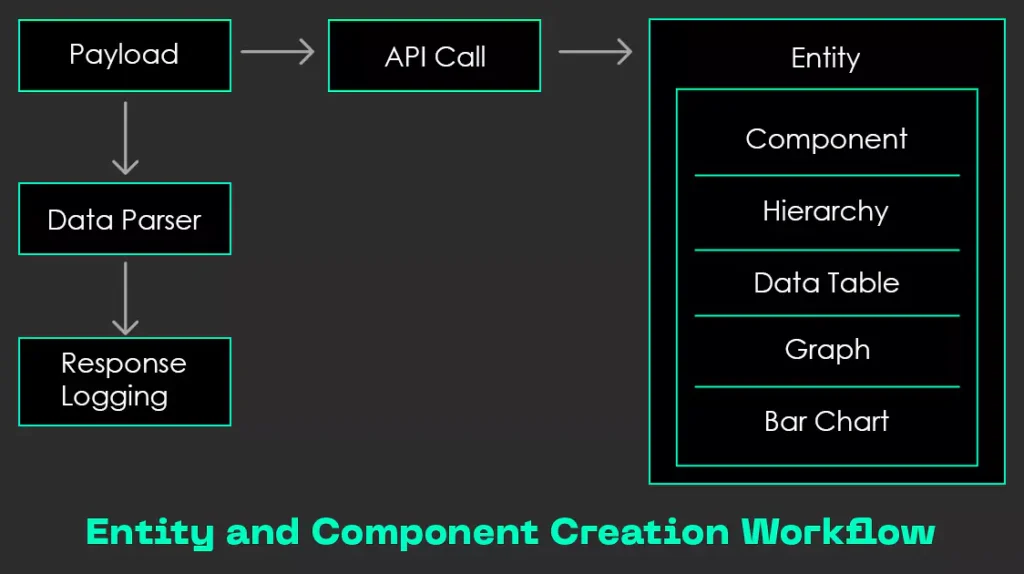
Fig: Entity and Component Creation Workflow
What Impact Does API Automation Have on UI Testing and Test Coverage?
The introduction of API automation can have a significant impact on the testing approach, especially when it comes to the UI automation process. By shifting a large portion of your testing process to API automation using Katalon Studio, you’ll be able to drastically reduce the manual effort and time spent on testing various data combinations in the user interface. If automation didn’t exist, testing each data combination via the UI may get extremely time-consuming and inefficient, often requiring multiple hours or even days to execute a comprehensive test suite.
However, with API automation in place, you can test over 80% of data combinations in under 1.5 to 2 hours, a task that would have previously taken several days through manual UI testing. Such speed and efficiency will have a profound effect on the overall testing strategy, especially for applications that require validation of a wide range of data combinations.
To sum up the impact, you can refer to these key benefits:
- Reduced UI Testing Effort: Eliminates the need for manual testing of data combinations, allowing testers to focus on exploratory testing and edge cases.
- Faster Feedback: Tests 80% of data combinations in under 1.5 to 2 hours, accelerating issue detection and improving application quality.
- Increased Test Coverage: Automates hundreds of scenarios, uncovering potential issues missed in manual testing.
- Focused Exploratory Testing: Frees testers to explore the application deeply, ensuring robust validation under real-world conditions.
- Improved Scalability: Adaptable for different environments and organizations, enabling efficient testing across multiple projects.

15 man-days of testing – gone in a flash! Learn how we cut through inefficiencies with smart automation to accelerate QA cycles for our customer.
Up until this point, you’ve explored the theoretical concepts and benefits. Now, let’s dive into the steps for conducting API automation with Katalon Studio.
How to do API Automation with Katalon Studio?
Here’s a stepwise breakdown of API automation process with Katalon Studio that will help you optimize web application testing:
Step 1: Prepare Test Data in Excel
- In this scenario, an Excel sheet contains multiple test cases with a Payload column that defines different data combinations for testing.
- Each row represents a test case with values like Component Name, User ID, Filters-Payload, Measures, and Component Group.
Step 2: Parse Payload Data
The Data Parser extracts key parameters dynamically from the payload, such as:
- Component Name
- User ID
- Filters – Payload
- Measure
- Additional Info
Before execution, the Katalon project structure incorporates the Excel file in a JSON-compatible format.
Refer to this snapshot for more clarity:

Screenshot: Katalon Project Structure before script execution
In this snapshot, you can see that, I’ve added the excel file under JSON data structure as Component_APIdata.xlsx:

Screenshot: Component API Data Excel before getting response
Step 3: Execute Fetch API Call
The extracted data is then dynamically inserted into the Fetch API call to retrieve relevant information from the backend.
The API response provides the necessary data for the following steps in the workflow.
Step 4: Create Entity & Add Component
Testing the creation of Entities (Dashboards) and Components (Data Visualizations like Tables, Charts, etc.) with various data combinations is crucial for validating the dynamic nature of the application.
Manually testing these combinations is slow and limited. By leveraging API Automation with Katalon Studio, you can efficiently test hundreds of data combinations in a structured and repeatable way.
The main purpose is to automate the validation of entity and component creation across a wide variety of user-driven data inputs. This is to ensure accurate rendering and backend processing.
Here’s how it works:
For each test run:
- Data is pulled from an Excel sheet containing diverse combinations.
- The Fetch API pulls relevant backend data using these inputs.
- Then, the test case dynamically creates the Entity and Component, capturing the results in Excel.
Here’s an example of data combinations:
Each test run dynamically pulls a new row from the Excel file and feeds it into the Fetch API. The Entity and its Component are created based on this data and validated through response handling.
Refer to this table:

Screenshot: Data Combinations Example
Take a quick glance at a flowchart that showcases the AP automation workflow:
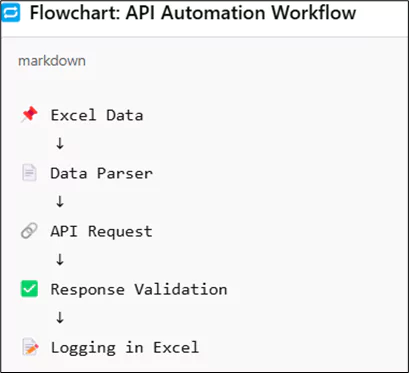
Screenshot: API Automation Workflow Flowchart
After executing the DataCombination test suite, responses can be saved into a new Excel sheet named Component_APIData_DateandTime.xlsx under a designated column.
Refer to these snapshots for clarity:

Screenshot: Katalon Project Structure after script execution

Screenshot: API Response – success or failure status

Screenshot: API Response
Step 5: Response Validation
After each API request, the response is analysed to determine the success or failure of the Entity & Component creation process.
This snapshot demonstrates how different response status codes are handled:
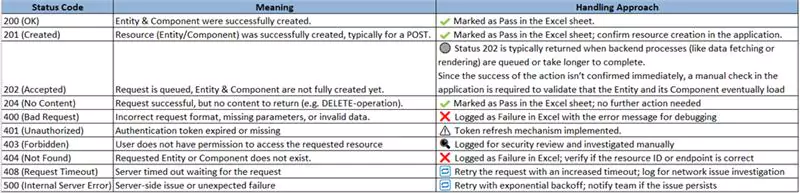
Screenshot: Response Status Code
Step 6: Log Results and Update Excel Sheet
The test case then records the results in an Excel sheet, capturing details such as:
- Entity URL
- Entity Name
- Response Status
- Captured Data Combinations
This helps maintain a record of all API responses, enabling easy tracking of successfully processed data combinations and identifying those that may need further review.
Step 7: Integrating API Automation into CI/CD Pipelines (the bonus step)
To further enhance test efficiency and reliability, the next step is to integrate our API automation suite into a CI/CD pipeline. This integration allows test cases to run automatically during every code deployment or update. This ensures faster feedback and early defect detection.
This is how you can integrate API automation into the CI/CD pipeline (for example, with Azure DevOps):
1. The developer will first push the code to GitHub.
2. Next, build pipeline is triggered via Azure DevOps.
3. The Katalon API test suite is then executed, either automatically or through manual initiation, depending on the workflow setup. Here’s what it does:
- Reads test data from Excel
- Sends API requests (Fetch, Create Entity, and Component)
- Validates responses and logs results
4. The test results are published to Azure Devops or emailed to the stakeholders.
5. Upon successful validation, the application gets deployed to staging or production.
What’s the Final Takeaway?
The adoption of API automation using Katalon Studio can introduce measurable improvements across the web application testing/software testing lifecycle. Automating the creation and validation of Entities and Components across diverse data combinations can lead to over 70% reduction in manual QA effort per sprint.
With the ability to process and validate over 150+ data combinations in just a few hours, test coverage can expand nearly 3 to 4x. It makes the testing process significantly faster and more comprehensive, according to the scenario you just read about (these numbers will vary according to the application you’re dealing with).
While certain edge cases, such as handling specific status codes, may still require manual oversight, the overall workflow can now be streamlined and can remain consistent. The modular framework is built to scale, supports integration into CI/CD pipelines, and extends easily to cover other API domains like User Management, Permissions, and Reporting. These capabilities not only accelerate release cycles and enhance test accuracy but also improve resource utilization and enable earlier detection of critical defects. These drive higher product quality and faster go-to-market outcomes.
So, as systems grow more complex, a well-architected API testing strategy becomes not just an advantage but a necessity for sustaining product quality and agility.
My advice for you would be: If you’re looking to enhance your software testing process, now is the time to embrace the power of automation. At Nitor Infotech, our experts can help you align your testing goals with a clear execution roadmap, powered by the right tools and technologies. Reach out to get started!