

Snowflake is a cloud data warehousing platform. It features a scalable, flexible, and user-friendly architecture. Unlike legacy data warehouses, Snowflake decouples storage from compute. This allows customers to scale resources independently according to workload requirements. This enables optimal performance and cost efficiency.
Technology has changed drastically during the past few years, and with it, the consumption of data. It has become a pain in the neck for businesses to accommodate such vast amounts of data with the traditional on-premises data warehouses. This calls for a need to switch to cloud data warehouses like Snowflake, Redshift, and BigQuery. These types of cloud data warehouses not only provide huge data storage, but they also offer high-speed processing and enhanced data security with their robust architecture.
In this blog, I’ll specifically talk about Snowflake as a cloud data warehouse platform. I’ll break through its architecture and help you understand the AI advancements that enhance its abilities.
Before moving ahead, I’ve included a section to help you understand the key differences between on-premises and cloud data warehouses.
Enjoy the read!
What Are the Differences between On-Premises and Cloud Data Warehouses?
Typically, on-premises data warehouses are still suitable for small scale organizations such as schools, hospitals, etc. Whereas cloud data warehouses are suitable for multi-national companies doing business around the world.
The above paragraph is just a simple difference to bring you the context in layman’s terms.
You can choose the right type of data warehouse as per your needs. However, the table given below will help you analyze the key differences between these data warehouses concerning different features:

Fig: On-Premises Warehouses vs. Cloud Data Warehouses
Now that you’re familiar with the differences, it’s clear that cloud data warehouses offer significant advantages over on-premises solutions. With that in mind, let me introduce you to the advantages of Snowflake, one of the leading cloud-based data warehouse platforms.
What are the Advantages of Using Snowflake Data Warehouse?
Here are the major advantages of using Snowflake:
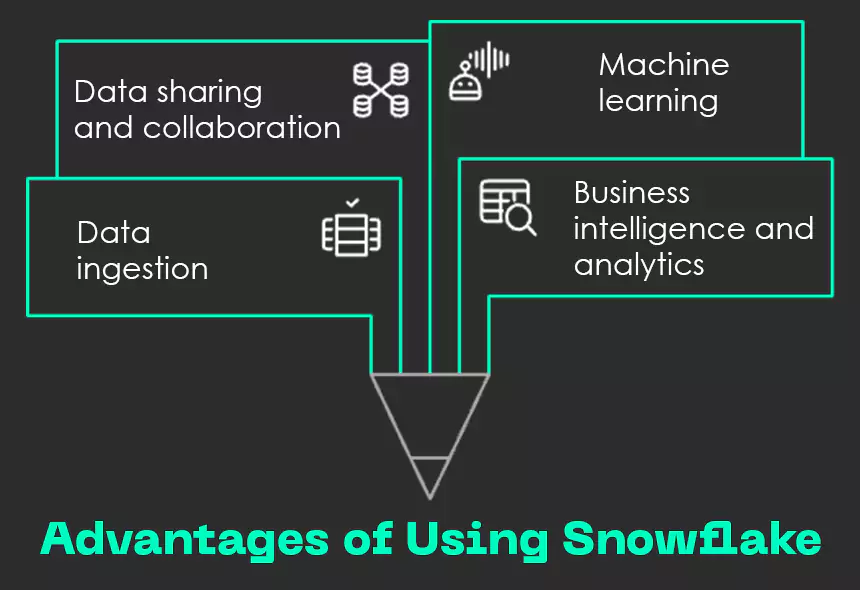
Fig: Advantages of Using Snowflake
1. Data ingestion: Snowpipe is Snowflake’s data ingestion service that helps organizations load data automatically as soon as it arrives in external storage systems like Amazon S3 or Azure Blob.
With capabilities like auto-ingest and integration with cloud provider notifications, it ensures continuous and efficient data loading into Snowflake tables without manual intervention.
2. Business intelligence and analytics: It empowers organizations to extract valuable insights from their data using dynamic reporting and sophisticated analytics tools. The solution’s compatibility, with popular business intelligence tools such as QuickSight, Looker, Power BI, and Tableau enhances its ability to provide valuable insights for organizations.
3. Data sharing and collaboration: It offers a seamless and secure way for users to share and collaborate on their data via Snowflake Marketplace. This Marketplace serves as a unified hub where users can explore and access a variety of data assets, including datasets and data services, shared by different organizations. Snowflake ensures these assets meet specific quality and security standards through a verification process. This makes it easy for users to:
- find relevant data,
- evaluate multiple options, and
- gain quick access to the resources that best suit their needs.
In September 2024, Snowflake introduced a new functionality to support the travel and hospitality industries. This helps companies connect their data and applications to enhance dynamic pricing, operational efficiency, reputation management, and sustainability tracking.
4. Machine learning: It supports machine learning use cases, enabling data scientists and analysts to build, train, and deploy machine learning models within the Snowflake platform. This includes loading, transforming, and managing large datasets, as well as integrating them with popular machine learning libraries such as TensorFlow and PyTorch.
Additionally, Snowflake integrates directly with Apache Spark to streamline data preparation and facilitate the creation of machine learning models (ML models). With support for programming languages like Python, R, Java, and C++, it empowers users to leverage these tools to develop sophisticated ML solutions.
In addition to the benefits mentioned above, Snowflake also brings robust data governance capabilities to the table. Read about this next!
How Does Snowflake Ensure Top-Tier Data Governance?
The following features ensure robust data governance for all data stored and accessed within Snowflake:
- Data Quality Monitoring and Metrics: Enables you to assess the health and consistency of your data by leveraging both system-defined and custom-built data metric functions.
- Column-Level Security: Enables the application of masking policies to specific columns in a table or view to control visibility at the data field level.
- Row-Level Security: Applies row access policies to filter which rows users can view in a table or view based on defined conditions.
- Object Tagging: Facilitates the identification and tracking of sensitive information for purposes such as compliance, data discovery, protection, and monitoring resource utilization.
- Tag-Based Masking Policies: Enhances data protection by linking masking policies to tags, which can then be applied to specific database objects or across the Snowflake account.
- Sensitive Data Classification: Supports regulatory compliance and data privacy efforts by identifying and categorizing data that may contain personal or sensitive information.

Discover how our data warehouse and dashboards empowered a leading retail chain to decode customer behavior and make smarter, faster decisions through crystal-clear visualizations.
At this point, you’re probably curious about how all of this works behind the scenes.
So, next, I’ll walk you through Snowflake’s architecture and explain how it manages data seamlessly.
What does Snowflake’s Architecture Look Like?
Snowflake employs a unique architecture that blends the best elements of both shared disk and shared-nothing database models. Like the shared-disk approach, it maintains a centralized storage system. This is where all compute nodes can access persisted data.
At the same time, it mirrors the shared-nothing model by leveraging massively parallel processing (MPP) clusters—each node within these clusters holds a local segment of the data and handles a portion of the query independently.
This combination allows Snowflake to deliver the ease of centralized data management along with the high performance and scalability typically associated with distributed systems.
Here’s how Snowflake’s architecture looks:

Fig: Architecture of Snowflake
Let’s break down each section one at a time!
Data Storage:
When you load data into Snowflake, it automatically transforms the data into its own compressed, columnar format that’s optimized for performance. This processed data is then stored in the cloud. Snowflake takes care of everything related to how the data is organized and maintained, including file structuring, sizing, compression techniques, metadata, and storage layout. The stored data itself isn’t directly accessible by users; it can only be interacted with through SQL queries executed within the Snowflake environment.
Query Execution:
All query processing happens within Snowflake’s compute layer, which utilizes what are known as “virtual warehouses.” These are independent clusters built using massive parallel processing (MPP). Each cluster is made up of various nodes sourced from the cloud provider. Each virtual warehouse functions in isolation. This means it doesn’t share computing resources with others, so the performance of one query workload doesn’t interfere with another.
Cloud Services Layer:
This layer works as the backbone of Snowflake’s operational coordination. It includes a range of services that are responsible for overseeing and managing platform activities. This includes query planning, user authentication, metadata management, and task scheduling. These services operate on computer instances that Snowflake provisions from its cloud infrastructure provider.
Onwards to learn more about data management in Snowflake!
What Makes Data Management Seamless in Snowflake?
Snowflake simplifies management of data by supporting standard SQL operations such as SELECT, DDL, and DML throughout the entire data lifecycle, from data organization and storage to querying, manipulation, and deletion. This makes it both intuitive and user-friendly.
Refer to this diagram given below that showcases the Snowflake data lifecycle:
Fig: Snowflake Data Lifecycle Video
1. Organizing Data: In Snowflake, you have the flexibility to structure your data using databases, schemas, and tables, without any imposed limits on how many you can create at each level. Whether you’re defining multiple databases or nesting numerous schemas and tables within them, Snowflake allows it all. You can modify these objects using commands like CREATE DATABASE, ALTER DATABASE, CREATE SCHEMA, ALTER SCHEMA, CREATE TABLE, and ALTER TABLE.
2. Storing Data: Snowflake allows you to insert data directly into tables and supports loading data from external formatted files using DML operations. Common commands used for this purpose include INSERT and COPY INTO.
3. Querying Data: Once the data gets stored in a table, you can retrieve and explore it using SELECT queries.
4. Working with Data: Once the data gets stored in a table, you can perform a full range of standard DML operations. This includes UPDATE, MERGE, and DELETE to modify or manage the data. It also supports powerful DDL capabilities. This allows you to clone entire databases, schemas, or tables for efficient testing and development.
5. Removing Data: To remove the data, you can do either of these:
- use the DELETE command for specific records
- opt for more extensive actions like TRUNCATE to clear all data from a table
- use DROP to completely remove tables, schemas, or even entire databases
Next, let’s explore how Snowflake complements AI!
How Is Snowflake Revolutionizing AI Workflows Within Its Ecosystem?
Snowflake’s scalable architecture is the key to enabling AI initiatives. It allows computing resources to automatically adjust based on the changing demands of complex AI workloads. This ensures smooth and efficient performance at every stage.
As AI projects often involve large datasets and complex computations, Snowflake’s horizontally scalable architecture allows organizations to seamlessly increase or decrease computational power, ensuring optimal performance during tasks such as model training, inference, and data processing.
This scalability enhances the efficiency of AI workflows and enables organizations to handle growing data volumes and evolving computational requirements. This facilitates the development and deployment of sophisticated AI solutions.
Here are some ways in which Snowflake revolutionizes AI workflows:
1. Snowpark ML: Snowpark ML serves as the Python library and foundational framework for complete ML workflows within Snowflake, encompassing functionalities for both model development and operations. With Snowpark ML, users can work with popular Python libraries for tasks like data preprocessing, feature engineering, and model training—all within the Snowflake environment. This eliminates the need for moving data across platforms. It helps maintain data integrity, security, and compliance throughout the machine learning lifecycle.
2. Snowpark container services: Snowpark Container Services simplify the process of deploying, managing, and scaling containerized workloads—such as jobs, services, and functions—directly within the Snowflake environment. By utilizing Snowflake’s managed infrastructure and offering customizable hardware options like NVIDIA GPUs, these services ensure high-performance execution tailored to demanding workloads.
Developers can customize Large Language Model (LLM) applications directly within Snowflake without data movement, deploying and fine-tuning open-source LLMs and vector databases with GPU infrastructure through the Snowpark Model Registry and integration with Snowflake Native Apps. This enables running sophisticated applications entirely within Snowflake, including notebooks and LLMOps tooling, for a seamless and secure development experience.
Snowpark Container Services also enable enterprise developers to build custom user interfaces for LLM applications using frameworks like ReactJS. These interfaces can be packaged as container images and deployed directly within Snowflake, allowing teams to deliver tailored, end-to-end solutions entirely within the platform’s ecosystem.
3. Cortex: This is a fully managed service designed to accelerate data analysis and AI development within the Snowflake ecosystem. It leverages machine learning to deliver automated insights and predictive capabilities with minimal setup. Cortex offers pre-built AI functions like sentiment analysis and text summarization accessible via SQL/Python queries or Snowsight interfaces. These AI functions enable easy data interpretation.
It also supports the development of custom AI applications, including through Snowpark Container Services, facilitating flexible and scalable AI development directly within Snowflake.
As Cortex is easier to access and involves less complexity compared to using Snowpark or Container Services, it represents the next step in Snowflake’s AI and ML evolution. This empowers more organizations to adopt AI with minimal effort and reduced operational overhead.
You might be thinking: with so many cloud data warehouses out there, what makes Snowpark the right choice for me?
Well, to bring clarity to that mental blur, I’ve laid down a comparison between Snowpark and Redshift before wrapping up.
How Does Snowpark Compare to Amazon Redshift?
Here’s a table that compares Snowpark with Amazon Redshift:
| Feature | Amazon Redshift | Snowpark |
|---|---|---|
| Data Automation | Requires manual maintenance like vacuuming and compression. | Fully automated with minimal manual intervention. |
| Data Sharing | Limited to AWS tools; sharing semi-structured data can be complex. | Effortless cross-account sharing without duplicating data. |
| Integration & Performance | Works best with AWS services; supports fast loading from S3 and EMR. | Available on AWS Marketplace; integrates well with tools like Spark and Tableau. |
| Security | Offers encryption, IAM, SSL, and security groups. | Provides robust security tools ensuring compliance and data protection. |
Based on the points discussed above, it’s clear that cloud data warehouses are shaping the future of data management, and Snowflake stands out as a strong contender thanks to its scalability, automation, and user-friendly experience.However, I’ll leave the final decision of choosing the best cloud data warehouse up to you according to your business requirements.Wish to learn more about advanced cloud technology? Write to us at Nitor Infotech.