

Let’s face it – setting up a test automation framework shouldn’t feel like a project in itself. However, time and again, teams find themselves caught in the same repetitive cycle: manually setting up the Playwright Cucumber test automation framework. Whether you’re spinning up a new repo or bootstrapping a fresh test suite, the process feels all too familiar. It starts with scaffolding the project. Then comes the task of setting up test execution pipelines. Finally, teams deal with integrating version control systems.
This process involves significant effort in project scaffolding, test execution, and integrating with version control systems.
In this blog, you’ll learn how to use an AI assistant – GitHub Copilot Agent in VS Code, to automate the entire Playwright Cucumber framework development. From generating the scaffolding and enabling test execution to seamlessly integrating with GitHub, Copilot handles it all.
No terminal commands. No repetitive boilerplate. Just a streamlined, AI-driven workflow designed to accelerate your test automation journey from the very first commit.
Sounds like something worth embracing? Then let’s get started!
Why Choose GitHub Copilot Agent for Automating Framework Development?
GitHub Copilot Agent is an open-source agent that excels by automating entire development workflows, not just code suggestions. Unlike traditional Copilot, it can build and maintain frameworks, manage installations, fix errors, and push commits directly from your prompts. This game-changer for test automation professionals eliminates manual terminal commands and repetitive setup. This is how it lets you focus solely on framework functionality.
I mean, think of it like pairing with a developer who already knows exactly how you like your test automation structured—and never forgets a step.
Pretty impressive, isn’t it?
Now that you’ve seen a glimpse of what GitHub Copilot Agent can do, let’s take a closer look at the real value it brings to the table – its core benefits over other AI assistants.
What Makes GitHub Copilot Agent Stand Out from Other AI Assistants?
Here are some of the advantages of GitHub Copilot Agent that make it stand out from the rest:
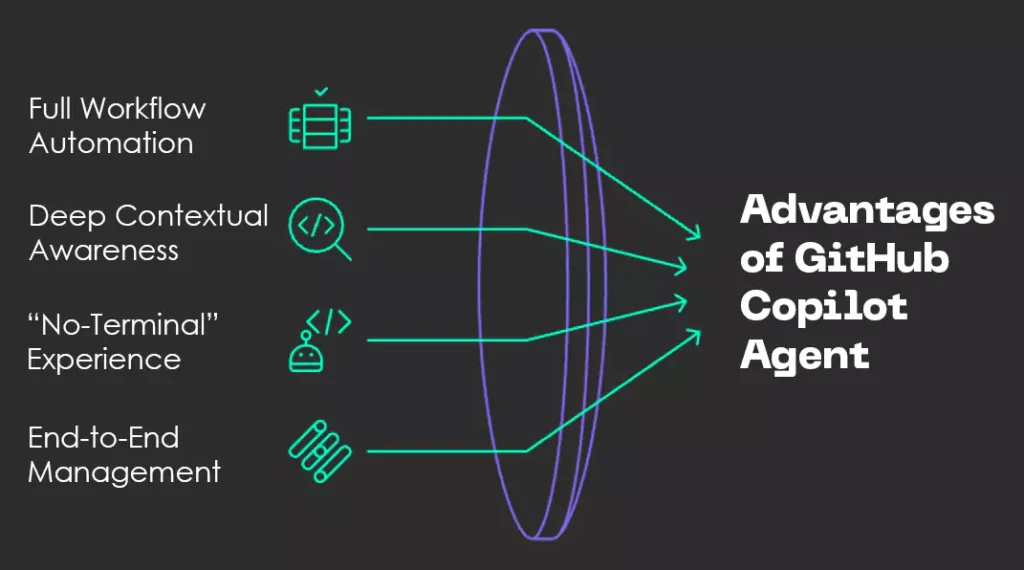
Fig: Advantages of GitHub Copilot Agent
- Full Workflow Automation: Unlike traditional AI tools that focus on generating isolated code snippets, GitHub Copilot Agent can handle entire multi-step workflows. It automates tasks end-to-end—saving time and reducing context-switching.
- Deep Contextual Awareness: The Copilot Agent doesn’t just understand individual prompts. Rather, it taps into your entire VS Code project context. This means that it can make smarter decisions based on project structures, dependencies, and file histories. The result: more accurate and tailored automation.
- “No-Terminal” Experience: Teams can forget jumping between the IDE and the command line. GitHub Copilot Agent executes shell commands, installs packages, and runs test scripts—all from within VS Code—delivering a seamless, IDE-native experience that boosts productivity.
- End-to-End Management: Whether it’s initializing a test framework, configuring CI/CD steps, or preparing for deployment, Copilot Agent will cover everything. It manages everything from setup to commit, so teams can focus on refining functionality instead of getting bogged down in repetitive setup.
Now, let’s shift gears and get practical. Before diving into the actual step of AI-powered automation, it’s important to understand the prerequisites that set the foundation for a smooth setup.
Keep reading to know about it!
What Are the Prerequisites for AI-Powered Automation for Playwright Cucumber Framework?
Before starting AI-powered automation, make sure you have these essential tools for your Playwright Cucumber (JavaScript) framework:
- VS Code Insiders: First, you need to download VS Code to access the latest Copilot Agent features.
- GitHub Copilot Agent Extension: Next, install the GitHub Copilot Agent extension in VS Code and sign in with your GitHub account.
- Project Folder: Then, create a dedicated folder (for example, playwright_bdd_1).
- Create Agent Prompt: Finally, prepare a prompt like this:
“Generate a Playwright BDD framework with Page Object Model, Cucumber integration, and reports.”
You can also use any AI assistant like ChatGPT to help you craft a prompt tailored to your specific requirements. Here’s an image for your reference:
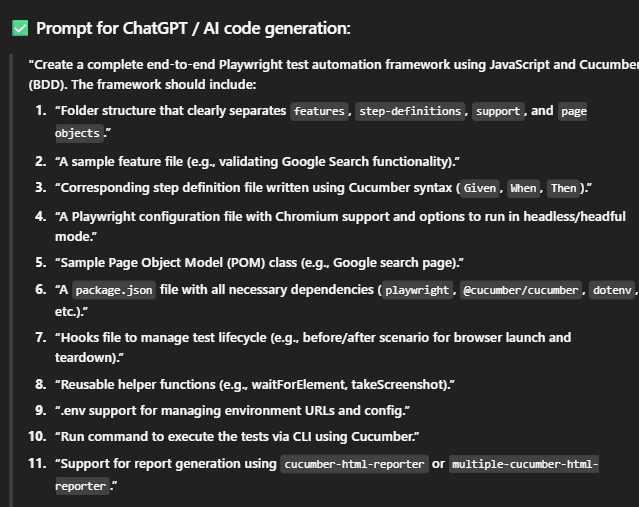
Screenshot: Prompt for ChatGPT
Once you’ve completed the setup, you’re all set to activate the AI agent and let it take over the heavy lifting—automating your framework with just a single prompt.

Discover how we transformed a leading US-based home care software provider’s application migration. We achieved a remarkable 50-60% increase in code conversion accuracy.
How to Build a Playwright BDD Testing Framework with AI Prompts
Here’s a visual representation of a step-by-step workflow for setting up a Playwright Cucumber automation framework using GitHub Copilot Agent in VS Code that I created:

Fig: Playwright Cucumber automation framework using GitHub Copilot Agent
Let me break down the whole process!
Step 1: Scaffolding the Playwright BDD Framework
I began by entering the initial prompt into the Copilot Agent interface within VS Code. The project folder was completely empty at first—but within seconds, the agent sprang into action, intelligently generating the entire framework structure and kickstarting the automation process like magic.
I’m not kidding; here’s what the agent did:
- Initialized npm and installed necessary Playwright and Cucumber dependencies.
- Created a well-organized folder structure including features, pages, step_definitions, and node_modules.
- Generated files such as package.json, configuration files, and example feature files.
All it took was a few clicks—just hitting “Continue” to confirm the prompts. No manual typing, no terminal commands, and absolutely no context-switching required. The agent even handled installing Playwright libraries and setting up the Cucumber environment automatically.
Step 2: Writing and Running The First BDD Test
With an empty feature file, instruct the agent to create a simple test scenario.
Here’s a prompt that I’ve used (feel free to use the same or tweak it according to your preference):
“Create a test scenario: open Google.com and verify the page title.”
The agent then took over, setting up a Playwright browser instance, providing Page Object Models for cleaner code, and handling test execution and error reporting.
When I ran the test, the agent proactively identified and offered to add missing implementations. With a few confirmations, the framework seamlessly evolved to include proper Cucumber step definitions, hooks, and glue code, eliminating manual troubleshooting.
Step 3: Enabling Video Recording and Screenshots
To enhance test reporting, I provided the following prompt to the agent:
“Enable video recording and screenshots for each test run.”
The agent then automatically updated the Playwright configuration files to enable visual reporting—capturing snapshots of test executions for better traceability and debugging.
Upon re-executing the tests, the following results were generated:
- Videos of browser interactions during test runs.
- Screenshots taken at key points in the tests.
- HTML reports summarizing test outcomes with detailed steps.
This feature turned out to be incredibly valuable—not only for diagnosing and debugging flaky tests with greater precision, but also for seamlessly sharing test results and visual evidence with stakeholders. It made collaboration and issue resolution much more efficient.
Step 4: Fixing Errors and Fine-Tuning via the Agent
During the setup phase, it’s not uncommon for configuration or helper files to throw occasional errors. Rather than resolving them manually, you can rely on the Copilot Agent’s capabilities to intelligently identify and fix these issues, streamlining the entire setup process.
To tackle such a scenario, I used this prompt:
“Analyse and correct these issues.”
The AI agent quickly detected common issues such as syntax errors and missing imports, then proactively applied the necessary fixes without any manual input.
This showcases its ability to go beyond simple code generation; it actively supports code maintenance throughout the development lifecycle. By resolving these problems in real time, it significantly cuts down on debugging efforts and keeps the workflow smooth and uninterrupted.
Step 5: Creating README and. gitignore Files Automatically
Understanding the importance of clear and consistent documentation, I prompted the agent to generate key project files—such as .gitignore and README.md.
Here’s the prompt that I used during this step:
“Add a README.md and a. gitignore file.”
The agent then generated a detailed README.md outlining how to run the framework, its dependencies, and folder structure, significantly easing onboarding.
At the same time, the agent also generated a customized .gitignore file—carefully crafted to exclude clutter such as node_modules and other unnecessary files. This ensured the repository stayed clean, lightweight, and free from redundant content, aligning perfectly with best practices in version control.
Step 6: Pushing the Framework to GitHub via Agent
To wrap up the workflow, I created a new GitHub repository (you can also select an existing one). Then I instructed the agent to push all the project files to the remote repo. With minimal effort, the entire codebase was version-controlled and ready for collaboration.
Here’s the final prompt that I used:
“Push all project files to GitHub. (Paste GitHub repo link) ”
The agent then seamlessly took over the entire Git workflow, handling version control operations end-to-end. Here’s what it accomplished:
- Initialized the local Git repository: If the repository wasn’t already initialized, the agent took care of it—setting up the .git structure needed to begin version tracking.
- Added the remote origin: It connected the local project to the appropriate GitHub repository by configuring the remote origin, ensuring smooth syncing between your local and remote codebases.
- Committed all relevant files: The agent staged and committed all necessary project files, automatically excluding any files listed in the .gitignore to keep the repository clean and efficient.
- Pushed the complete framework to GitHub: Finally, it executed the git push command, uploading the fully functional test automation framework to the remote repository—completing the setup with zero manual intervention.
This level of automation spared me from manually typing a series of Git commands, streamlining the entire version control process. With just the right prompts, the project was fully Git-enabled—saving time, reducing potential errors, and keeping everything effortlessly in sync.
Before I close out this journey, let’s go over some final takeaways and things you’ll want to keep in mind.
Key Takeaways and Final Thoughts
Building a complete Playwright Cucumber framework in just 15 minutes using GitHub Copilot Agent was nothing short of eye-opening. It wasn’t just about speed—it was about eliminating friction from start to finish.
For a quick recap, here’s what the agent handled with ease:
- Instantly structured the entire project without any boilerplate copying.
- Installed and configured everything needed for Playwright, Cucumber, and supporting tools.
- Generated readable, modular tests and ran them, all through simple prompts.
- Identified issues like missing imports or syntax errors and fixed them autonomously.
- Enabled visual debugging and test traceability without extra setup.
- Created essential files like README.md and .gitignore, then pushed everything to GitHub—no manual Git commands required.
And the best part? Not a single terminal command was typed.
This experience clearly shows how AI agents can drastically accelerate automation workflows while reducing the grunt work to nearly zero.
A note of caution: While the AI streamlines much of the work, a solid understanding of Playwright, BDD, and Cucumber is still vital. This knowledge lets you effectively guide the agent, review its output, and tackle complex problems.
To sum it up, this AI-assisted approach isn’t just a productivity booster. It’s a glimpse into the future of software and test automation. By offloading repetitive setup tasks and letting AI handle the heavy lifting, developers and testers can focus more on strategy and logic, not boilerplate.
So, if you’re looking to streamline your framework-building process and reclaim valuable time, I strongly recommend giving GitHub Copilot Agent with VS Code Insiders a try. It’s a game-changer you’ll want to experience firsthand.
Ready to supercharge your automation journey using the advanced tools and technologies available today? Reach out to us at Nitor Infotech, an Ascendion company. We can help you build intelligent, scalable, and future-ready automation frameworks. Our software accelerates quality assurance and enhances development efficiency with the power of agentic AI.