

Highlights
Matillion ETL still anchors many cloud data integration stacks, but the way teams build and run data pipelines is changing fast. This updated guide covers:
- What Matillion ETL is, how push-down ELT works, and where Maia, Matillion’s agentic AI data team, fits in
- Eight refreshed ETL best practices for performance, security, monitoring, scalability and cost
- How to build reliable data pipelines with orchestration, incremental data loading, CDC and automated data quality
- How agentic AI data engineering works with human-in-the-loop governance
- Where cloud ETL is heading next
Nowadays, in the data-driven economy, business decision-making is impossible without a flawless data integration process. Without an effective ETL (Extract, Transform, Load) solution, data engineers must struggle with unreliable scripts, delayed reporting, and costly cloud infrastructure. Matillion has been solving these problems for some time, but with Maia, it offers an agentive AI solution in the ETL process.
What Is Matillion ETL?
Matillion ETL is a native ETL/ELT platform designed for extracting data from various sources and loading it into cloud data warehouses like Snowflake, Databricks, Amazon Redshift, Google BigQuery, and Azure Synapse Analytics, performing transformation directly on the warehouse. The intuitive, browser-based interface helps teams create and execute jobs with little code required.
Key capabilities of the Matillion ETL tool:
- Visual job design with live validation and data previews
- Push-down ELT, so warehouse compute handles joins and aggregations over millions of rows
- 80+ prebuilt connectors, plus the option to build your own
- Collaboration and control: Git integration, version control, shared jobs and environments
- Enterprise security: SSO through OpenID or LDAP, group permissions and audit logs
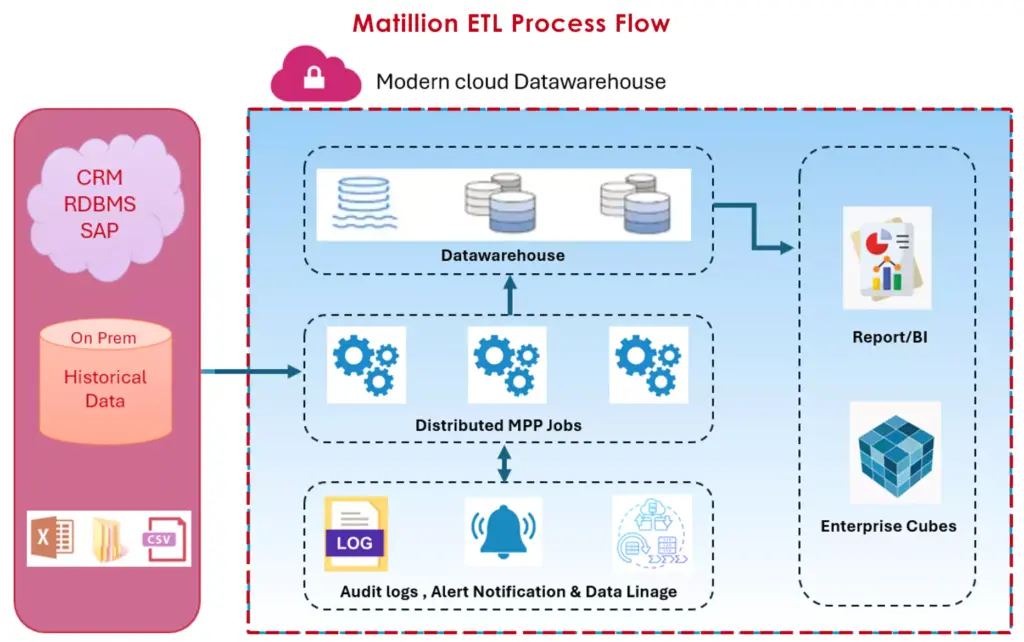
Fig: Matillion ETL Process Flow
ETL vs ELT: What’s the Difference?
In the classic ETL process, data is transformed before it is loaded. ELT reverses the order, which suits elastic cloud warehouses.
| Aspect | ETL | ELT (Matillion’s approach) |
| Order of steps | Transform, then load | Load, then transform in the warehouse |
| Where transformation runs | Separate ETL server | Cloud data warehouse compute |
| Scalability | Limited by the ETL server | Elastic with the warehouse |
| Best suited for | Strict pre-load compliance, legacy or on-premises systems, stable schemas | Cloud ETL with large, diverse, semi-structured data |
| Raw data retained | Usually not | Yes, so you can re-transform later |
Maia: The AI Evolution
Matillion’s Maia was introduced in June 2025 as a team of data engineering agents within the Maia Foundation, which was formerly known as the Data Productivity Cloud. Maia AI Agents create pipelines from natural language inputs and investigate and resolve problems with data. Matillion ETL is still available with version 1.80 being a long-term support version, and there is an upgrade process to Maia.
Matillion ETL Tutorial: Your First Job in Five Steps
- Launch Matillion ETL from your cloud marketplace (AWS, Azure or Google Cloud) and choose an instance size that fits your users and environments.
- Connect to the instance from your browser.
- Create a project for your target platform, such as Snowflake.
- Set up cloud and warehouse credentials, preferring key-pair authentication or a secrets manager.
- Build an orchestration job: a load component, a Run Transformation step, an Assert check and a schedule.
Best Practices for Optimizing Matillion ETL Pipelines
These ETL best practices keep the original eight areas, updated for how Matillion ETL, cloud warehouses and the wider cloud ETL ecosystem work today.
A) Transform Large Datasets
Best practices
- Bulk load, then transform in the warehouse: use native load components (S3 Load, Azure Load, Cloud Storage Load) and load generators instead of row-by-row transfers.
- Tune compute where the work happens: Matillion ETL pushes joins and sorts to the warehouse, so right-size warehouse compute. Reserve instance memory tuning for orchestration, Python Script components and Tomcat.
- Filter early and aggregate: apply filters in source or intermediate steps, and summarize with SUM, COUNT or AVG instead of processing individual rows.
Pitfalls to avoid
- Running complex calculations across entire datasets. Stage intermediate tables or use window functions on partitions.
- Using the Python Script component for large transformations, since it loads data into instance memory. Prefer push-down SQL or process in chunks.
B) Execute Data in Parallel
In Matillion ETL, parallelism is an option that you have to choose and is not something that is automatically done for you. If there are components that diverge from a Start component, then they can run simultaneously. However, job concurrency, number of CPUs and memory in the instance, and warehouse concurrency limit the throughput. It’s important to fan out loads that are independent and have dependent steps sequentially.
C) Manage Passwords and Secrets
Always avoid keeping credentials in plain text or in the job variables/scripts. Matillion ETL keeps the passwords stored in encrypted form using the Manage Passwords option and is compatible with secret managers like Azure Key Vault, thereby keeping the credentials out of your jobs. Snowflake is shifting away from single factor authentication using password; hence, use key pair or access token authentication to connect services. Include SSO via OpenID/LDAP and use least privilege group permissions on Bash/Python components.
D) Strengthen Logging, Monitoring and Observability
In-built Logging remains high-level: Audit Log records key events, Catalina logs cycle according to schedule, and Job History takes up storage space. Close the loopholes by implementing monitoring of the data pipeline:
- Configure Catalina log rotation and watch storage so history does not fill the disk.
- Use Task History, Manage Error Reporting and the performance monitor for diagnosis.
- Send alerts through Slack, email or CloudWatch Publish, and ship logs to a central platform for long-term retention.
- Use Maia’s observability dashboard to track instances (version 1.65 or later) and the last 24 hours of job runs.
- Write run metadata, row counts and durations to an audit table, and add Snowflake query tags to trace cost and performance.
E) Handle Complex Datatypes
Make sure to use components which can be used for processing nested data like Extract Nested Data, Flatten Variant, and Construct Variant or Struct instead of using custom scripts. First of all, land your raw semi-structured data and then validate the landing schema against the expected schema and then flatten it down the line so that any schema drift will not affect the ingestion process.
F) Create Shared Jobs
With shared jobs, you can share logic between workflows. Think of it as your coding library, where you version it is using Git integration and Manage Versions, add documentation by adding Notes and job documentation, and use job variables to parameterize them. Remember to map out dependent workflows before making any changes to the shared job since every single one that depends on it will receive the updates too.
G) Manage Configurations
Configuration reversals are difficult and error-prone, so automate it. Differentiate development, testing and production environments using environments and environment variables, Git branches and merges, and tagging of each release. Promote automatically using the Matillion REST API, and conduct change rehearsal using a Snowflake zero-copy clone of the production environment.
H) Consider Costs
As data keeps growing, scaling compute and storage can erode cost-effectiveness. Industry comparisons also flag cost at scale and platform dependency as trade-offs, so plan early.
Best practices
- Review the Matillion ETL usage dashboard, right-size instances and schedule shutdown of idle non-production instances. Be careful with spot instances for the server itself, as it holds project metadata and job history.
- Right-size warehouses, enable auto-suspend and process incrementally to cut compute.
- Minimize data transfer and egress costs by optimizing data storage locations and avoiding unnecessary movement between cloud services or regions.
- Reassess licensing and subscription plans against actual usage, and track vendor pricing changes.
- Forecast future data processing needs and align budgets with them.
Pitfalls to avoid: unmonitored resource use, indiscriminate scaling, ignoring data transfer costs, outdated subscriptions, and short-term savings that hurt long-term scalability.
Collateral: Case Study. Discover how we helped a leading retail chain drive top-line growth and optimize sales and marketing functions with a dashboard and BI solution. Download the case study
Building Scalable and Reliable Data Pipelines with Matillion
Best practices pay off only when data pipelines are designed for growth and failure. These patterns apply whether you run Matillion ETL or Maia Foundation.
Orchestration
Keep logic flow separate from transformation. Jobs for orchestrating manage the orchestration of data: Start activity, load activities, Run Transformation, and End Success or End Failure, with If, And, Or and Retry activities for decision-making and retries. The Iterators activity iterates over files, tables, or grids, whereas schedules and triggers, such as S3 event via AWS Lambda, trigger run initiation. Ensure transformation jobs concentrate on push-down SQL.
Incremental Data Loading
Incremental data loading avoids reloading everything, cutting both cost and runtime. Matillion supports the high-water-mark pattern through incremental load tools such as JDBC Incremental Load and Salesforce Incremental Load, plus Detect Changes for comparing snapshots.
How to implement incremental loading:
- Choose a reliable watermark, such as an updated timestamp or sequence ID.
- Store the last loaded value in a control table or job variable.
- Extract only rows beyond that value.
- Merge them into the target so reruns stay idempotent.
- Advance the watermark only after the load succeeds, and reconcile periodically.
Change Data Capture (CDC) and Real-Time Data Integration
For those using Manage CDC, it is important to remember that it was built using AWS DMS and had its end-of-life date on 1st December 2024 and will be decommissioned from Matillion ETL. The alternative provided by Matillion is streaming pipelines in Maia that extract change information from Db2 for IBM i, SQL Server, MySQL, Oracle and PostgreSQL and load into Snowflake, Amazon S3 and Azure Blob Storage. Micro-batch processing may be more affordable and efficient in some cases.
Data Quality, Validation and Workflow Automation
Data quality by automation becomes part of the pipeline. Use Assert Table, Assert View, and Assert Scalar Variables after loads of important data to verify the number of rows, null values, duplication, and referential integrity, and direct errors to End Failure with an alert. Data quality pattern in Matillion gives a good initial pattern, and Maia Foundation includes Pipeline Quality Review as well. Make sure only validated changes are promoted and add ETL test automation to CI/CD.
Related Nitor Infotech reads
How Agentic AI Is Transforming Data Engineering with Matillion
Agentic AI data engineering goes beyond autocomplete. AI agents plan multi-step work, act on your project, check results and adapt. Maia applies this to the data engineering lifecycle as a supplement to your team, not a replacement.
- AI-powered pipeline development: describe the outcome in natural language and Maia AI Agents assemble the pipeline in Designer. They can also scan API documentation, configure authentication and pagination, and draft a custom connector that you review before saving.
- Context that encodes your standards: Markdown context files stored at .matillion/maia/rules/ capture naming conventions, governance rules and business logic that Maia always considers. Skills add reusable guidance that is applied when relevant.
- Automated troubleshooting: when a job fails, Maia examines the error and pipeline configuration and suggests fixes. If a column changes from customer_id to customerId, it can propose a mapping for human review.
- Intelligent data validation and pipeline optimization: steered by your rules, agents can help apply checks and spot SQL or design issues before they reach production, complementing Pipeline Quality Review.
- Human-in-the-loop governance: Plan mode presents a step-by-step plan for approval before any change, and sessions are private to each user. Pair it with Git branches and pull-request review so normal approval gates still apply.
Start with AI-assisted drafts, sample and review outputs, and expand autonomy only as trust grows. Keep context files current, because agents are only as reliable as the context they receive.
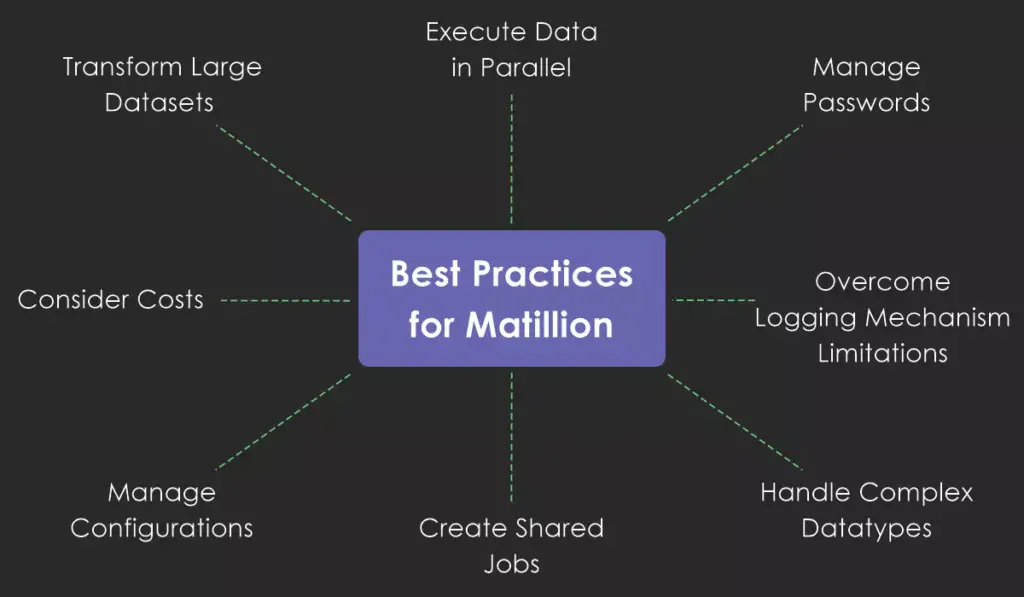
Fig: Best Practices for Matillion
Related Nitor Infotech reads
Future Trends in ETL and Cloud Data Engineering
- Real-time data integration for the right workloads. Streaming and CDC replace nightly batches where freshness drives value, while batch stays for simpler, high-volume jobs.
- AI-ready data architectures. AI agents need clean, current, well-described data from many sources. ETL supplies access, quality controls and integration, and teams are setting freshness SLAs per dataset.
- Autonomous data operations. Self-healing pipelines will detect, diagnose and fix known failure modes, with humans handling exceptions.
- Intelligent data governance. Lineage, metadata, masking and policy checks will be embedded in pipelines and agent context rather than bolted on afterward.
- AI agents as builders and consumers of pipelines. Agents will request pipelines directly, as Maia already allows, shifting data engineers toward architecture, governance and review.
That’s it! Matillion ETL remains a powerful ETL tool for efficient data integration, and understanding its constraints, modern practices and the AI-driven road ahead helps you get more from it.
Key Takeaways
- Matillion ETL is a push-down ELT tool for cloud warehouses, so tune warehouse compute, not just instance memory.
- Refresh the eight core practices: bulk loading, deliberate parallelism, secrets management with key-pair authentication, observability, nested-data components, versioned shared jobs, environment-based configuration and cost controls.
- Manage CDC is end of life; use streaming pipelines in Maia for real-time data integration.
- Combine orchestration, incremental data loading and Assert checks for reliable, automated data quality.
- Maia adds agentic AI to pipeline development and troubleshooting, with context files and Plan mode keeping humans in control.
- Plan your path from Matillion ETL to Maia on your own timeline.
Frequently Asked Questions
Ready to Modernize Your Data Pipelines?
Nitor Infotech, an Ascendion company, helps product teams and enterprises build scalable, AI-ready data platforms. Explore our Data Engineering & Analytics services or Contact Us to talk to our experts. You can also write to us at marketing@nitorinfotech.com.